2017/10/22
Citrix Receiver
Turns out the Citrix Receiver is a much much better solution.
All I need to do is install the Citrix Receiver instead.
To download the latest Citrix Receiver, you can download that from the official Citrix website or here .
During the installation, it will uninstall your previous Citrix On-Line Plug-in if you have installed previously.
After the installation, you may just do nothing (don't add any account or email address yet)
Go to http://hostname
The hostname is your Citrix server IP or domain name.
If it ask you to install the client or plug-in, just answer I have installed.
Then click any application, the Citrix Receiver will just launch the application for you.
(It might also download a lot of launch.ica, just use open always so you don't need to open them one by one)
2017/10/19
Citrix On-Line Plug-In
2017/06/13
如何在Windows 10 64Bit 安裝BI Publisher Desktop
但幸好印度同胞還是很無私的分享了怎麼解決。
然而目前即使是在windows 10 64bit上但它還是最多只能支援到office 32bit的版本。
有人64bit有裝成功,請不吝讓小弟開開眼界。
重點是一個元件MSCOMCTL.OCX
很幸運地,它要嘛在C:\Windows\SysWow64下就有,要嘛你用搜尋的去硬碟翻箱倒櫃一番也是找得到。
確定你的MSCOMCTL.OCX在C:\Windows\SysWow64下。
然後以系統管理權限執行命令列視窗
切換目錄到C:\Windows\SysWow64
Regsvr32 MSCOMCTL.OCX
看一下回你的訊息,不要太快關掉呀。
再來你就可以把它丟下去執行,去倒杯咖啡再回來,它就應該安裝完成了。
圖片一樣有空再來加了。
如何在Windows 10 64bit上安裝Oracle Developer Suite 10G
三個重點
- 以相容模式Windows XP SP2執行。
- 命令列要記得下-ignoreSysPreReqs,所以會是setup -ignoreSysPreReqs
- 虛擬記憶體要設成手動,最小256,最大則看你的實體記憶體,Windows會建議你最大設多少。設自動Installer死都不承認你有虛擬記憶體,很壞吧。💀
開始中文的內容
隨著時代的潮流,全球化的競爭。
小弟自認為小格文章寫的沒印度同胞好,技術層級沒洋人寫的漂亮。
於是小弟今天起在本小格(部落格)開始出版中文的技術內容。
希望有更多的流量及造福更多有需要的人。
後記:實驗證明. 中文反而流量更少.
2014/06/19
2013/02/06
Connect Amazon Web Service EC2
The connection problem caused me a headache.
Luckily still a lot of bloggers are sharing their knowledge and saved my time.
- Make sure you've downloaded your key pair in the folder you're accessible.
- Use the following command to connect to your server
ssh -i keypair_name.pem username@hostname_or_ip - Then you're ready to go!
2012/05/19
Make your Chinese SRT file display correctly
Recently I just upgraded my Ubuntu Desktop from 11.04 to 12.04 LTS. And of course a lot new problems came to me.
And one of the problem is the SRT file.
Actually, this is not a new problem to me, but I was always choosing the workaround way.
This time, no more workaround. I'll present you the correct way.
Until now I still don't have a clue for the root cause of this problem yet, but in chunghe's blog I found this is really nice and easy way to solve the problem.
Problem Description
The original contain of the SRT is like this.
I still can see the numbers, which means the file is somewhat correct, but the Chinese word didn't display correctly.
In gEdit, I tried to open it with UTF-8 encoding
There are errors
Solutions
For chunghe's blogpost, he introduced an utility called enca.
Usage1 show file information : enca <filename>
This will display the information of the file content. For my file here it shows
It's Big5(Is this the reason I cannot see the font correctly?) , with CRLF line terminators.
Usage 2 convert file to desired format : enca –x <encoding>
I wrote an scritp to do this. The content is :
enca -x UTF-8 < $1.srt > $1.utf8.srt
The content of the converted file.
Conclusion
This way is much easier and more straight and forward.
Before this, I have to copy the file to Windows environment and open notepad++ to convert it to UTF-8.
Now everything can be done under Ubuntu.
2012/03/24
Making Oracle Database XE Available to Remote Clients
I installed one Oracle Database XE for testing purpose.
And found that it won't be accessable from different client.
And finally I found the answer in Oracle Document
Here is the copied sentence...
Start SQL*Plus and log in as SYSTEM:
SYSTEM_DRIVE:\> sqlplus system
Enter password: SYSTEM_password
Or, if you are logging in remotely:
SYSTEM_DRIVE:\> sqlplus system@xe_server_host_name
Enter password: SYSTEM_password
At the SQL prompt, enter the following command:
SQL> EXEC DBMS_XDB.SETLISTENERLOCALACCESS(FALSE);
And it can be remote access now.
2012/03/18
Upgrade Oracle E-Business Suite R12.1.1 to R12.1.3 on Oracle Linux
Reference from Oracle Support DocId : 1080973.1
My EBS on my Oracle Linux is 12.1.1. I want to upgrade it to 12.1.3 to experience the new OAF Rich UI.
Here are my steps, the issues I encountered and the solutions.
Apply Patch 9239089
This one is easy.
Download the patch 9239089.
Unzip it.
Apply patch.
Apply Patch 9239090
This patch is big. It is seperated into 6 files, but still the same steps.
Download the patch 9239090.
Unzip them.
Apply the patch.
It spends a lot of time to apply this patch. And during applying the patch, there are several issues come to my server.
One is EGOSILDU.sql issue, which can be solved by DocId. 847687.1. But I don't use "Advanced Product Catalog" which I can ignore this issue by using adctrl and press 8.
And I also encountered another issue which is some form objects could not be compiled correctly.
au resource ASTACLIB.pll
au resource ASTCORE.pll
au resource ASTCUREL.pll
au resource ASTLSLIB.pll
au resource ASTCPREP.pll
au resource ASTOPLIB.pll
au resource IEXCORE.pll
au resource ASTRCALL.pll
au resource OKSSRVAV.pll
au resource ASTSLLIB.pll
au resource ASTCULIB.pll
au resource CSCUTILS.pll
And in this document
https://forums.oracle.com/forums/thread.jspa?threadID=2131259
Just recompile the db package AS_API_RECORDS_PKG and recompile the previous pll files to plx would solve this issue.
Apply Patch 9239095
This one is easy, too.
Download the patch 9239095
Unzip the patch
Apply the patch
Post-Updates Steps
Finally the patches of Oracle E-Business Suite R12.1.3 is done.I also need to apply patches 9817770 & 9966055, otherwise my responsibilities won't appear.
Update Code Level
To keep application tier and database tier the correct code level, do the following steps:
Login as application os user, cd $ADMIN_SCRIPTS_HOME, run adautocfg.sh to generate the context file.
cd $AD_TOP/bin, run admkappsutil.pl.
This will generate latest appsutil.zip under $INST_TOP/admin/out
Then login as database os user, cd $ORACLE_HOME, ftp or copy the appsutil.zip (which is created by application os user) to current folder.
unzip -o appsutil.zip
Run adautocfg.sh on $ORACLE_HOME.
then run adpreclone.pl dbTier using database user, and adpreclone.pl appsTier using application user.
Now everything is ready, you may startup your Oracle E-Business Suite 12.1.3 now!
2012/03/13
Oracle E-Business Suite R12 OAF Rich User Interface Enhancement
There are some new enhancements since Oracle EBS R12.1.2 was introduced, especially the OAF Rich UI.
I think Oracle is getting better and better now. I'm going to upgrade my R12.1.1 on my Oracle Linux later on.
Now let's give it a glance.
I just captured the picture from the document. All the copyright of the picture belong to Oracle.
Now we have new navigator in the left
You can put some embedded content, see the right
You can have Drop-Down Navigator Menu. I love this function myself.
The Drop-Down Favorites. I love this one too.
This one is even better! The Inline, look-ahead LOV window.
The Inline View Attachment Window
Inline Popup Window
Embedded OBIEE Analytic Contents. Every boss asked about this!
Embedded Custom Rich Content
Function after R12.1.3
Exceptions as Popups.
AutoVue Integration.
View Object Creation.
Create your own Dynamic View Object
Copy & Undo funtion
Summary
I think Oracle is really trying hard to get Oracle E-Business Suite better and better. Though it's not fast enough, but I think I still love these new functions introduced.Keep visiting my blog, I might have a chance to share my process of upgrade from R12.1.1 to R12.1.3.
See you soon.
2012/02/05
VMWare Memory Setting
Just want to keep this for I sufferred from the physical memory not enough error for one day.
In Additional memory part the 3rd option : Allow most virtual machine memory to be swapped.
It was the 2nd option : Allow some virtual machine memory to be swapped. And notice that the Reserved memory is 4545 MB.
I got available memory more than 4GB, VMWare still complaint I do not have enough memory for my 4G VM.
Though this option(3rd option) sacrificed the performance of the guest machine. At least I can have a slow but workable environment.
Valentine's Day 2012 VDatabase parameter setting (Reference)
alter system set processes=300 scope=spfile;
alter system set session_cached_cursors=200 scope=spfile;
alter system set sga_target=2G scope=spfile;
alter system set shared_pool_size=600M scope=spfile;
alter system set pga_aggregate_target=1G scope=spfile;
alter system set job_queue_processes=20 scope=spfile;
2012/02/04
SOA Suite Installation on Oracle Linux 5.7
According to Oracle official web page currently the SOA Suite can be installed only on 32-bit JVM.
In this article, we will install WebLogic, RCU, SOA Suite and JDeveloper.
OS Package Installation
compat-db-4.1.25-9sysstat-5.0.5-1
Kernel Parameters OS Resource Limitation
/etc/security/limits.conf* hard nofile 4096
* soft nofile 4096
Install WebLogic
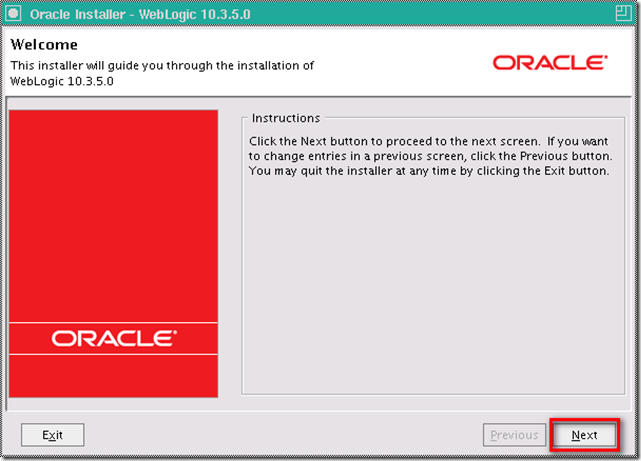
In the Welcome windows, NextSelect Create a new Middleware Home, and give the Middleware Home Directory, then Next
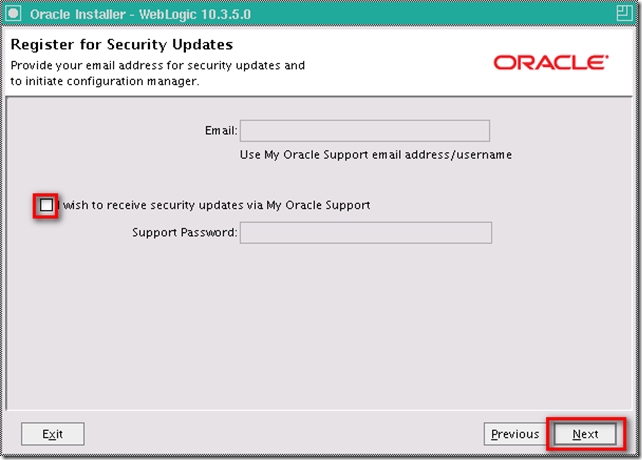
opt out I wish to receive security updates via My Oracle Support, then Next
Choose Typical as Install type, this will install WebLogic Server & Oracle Coherence, then Next
Specify the directory of WebLogic Server and Oracle Coherence, then Next
Review the Installation Summary, if no problem, then Next
Installing
opt out the Run Quickstart then Done
Install RCU DB Schemas
In Welcome window, NextChoose Create, then Next
Give the database connection information, then Next
After the check, then OK
Accept the default new Prefix DEV, opt-in the SOA and BPM Infrastructure, this will automatically opt-in Metadata Services under AS Common Schemas, then Next
After the check again, then OK
Give the password for all schemas, then Next
Review the Tablespaces, then Next
Because we do not have any tablespaces in previous review, so OK
Tablespaces created, then OK
Review the Summary, then Create
Repository created, then Close
Install SOA Suite
Give the JDK location under previous WebLogic Middleware HomeAccepted the default. You should have a group named oinstall already. Then OK
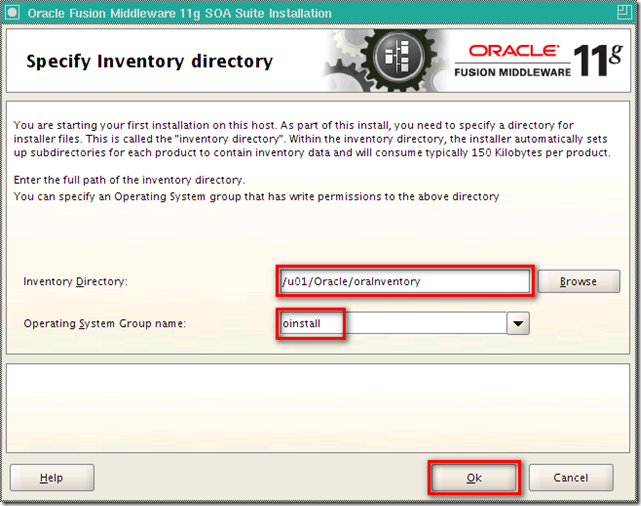
Need root privileges to run the createCentralInventory.sh
Logon as root and go to the directory previous dialog specified run the createCentralInventory.sh
Go back to the previous dialog, then OK
In Welcome screen, Next
Choose Skip Software Updates, then Next
Make sure the Prerequisite Checks are all passed, then Next
Specify the Oracle Middleware Home and accept the default name for Oracle Home Directory (this will be our DOMAIN_HOME), then Next
Accept the WebLogic Server as Application Server, then Next
Review the Installation Summary, then Install
Installing
Completed, then Next
Installation Complete, Finish
Configure SOA Suite
Under $DOMAIN_HOME/common/bin./config.sh
Choose Create a new WebLogic domain, then Next
Check the following products, then Next
Give the Domain name, Domain location, and Application location, then Next
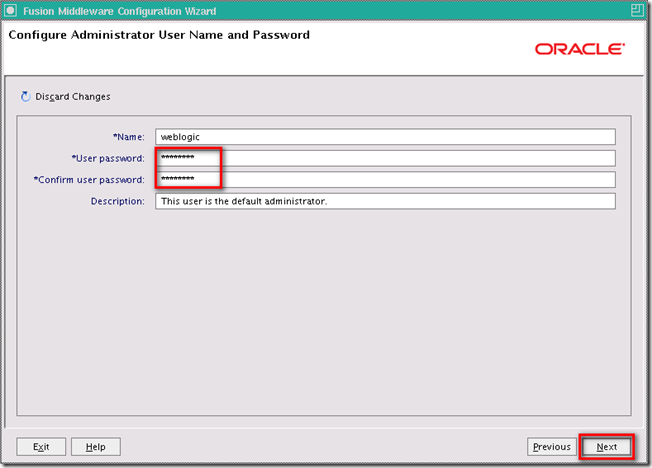
Give weblogic password, then Next
Choose Development Mode and Sun SDK, then Next
Check all the Component Schema, give the password (Created in RCU), and connection information, then Next
All the Component Schema tested, then Next
Check only Administration Server, then Next
Use default value for Administration Server, then Next
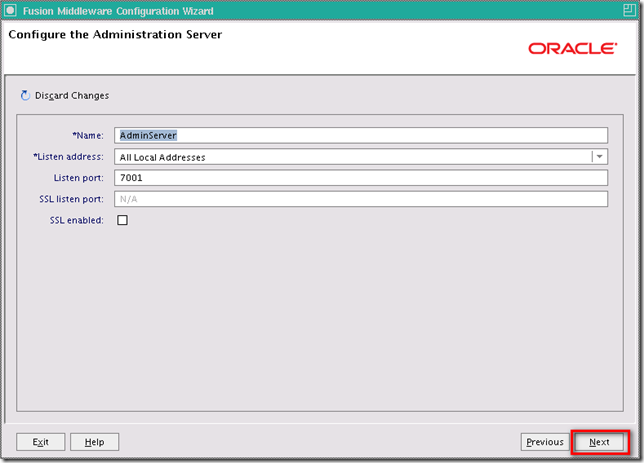
Review Configuration Summary then Create
Creating New Domain
Done
Install JDeveloper
In the Welcome window, NextChoose Create a new Middleware Home, and give a new directory for JDeveloper, then Next
Choose Complete as Install Type, then Next
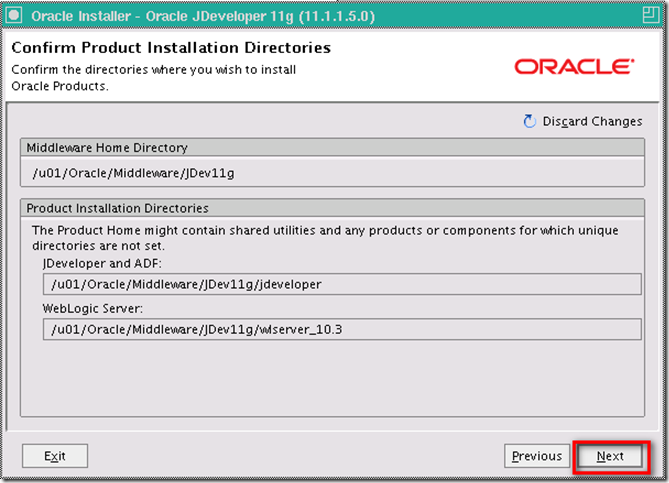
Confirm the directories are all right, then Next
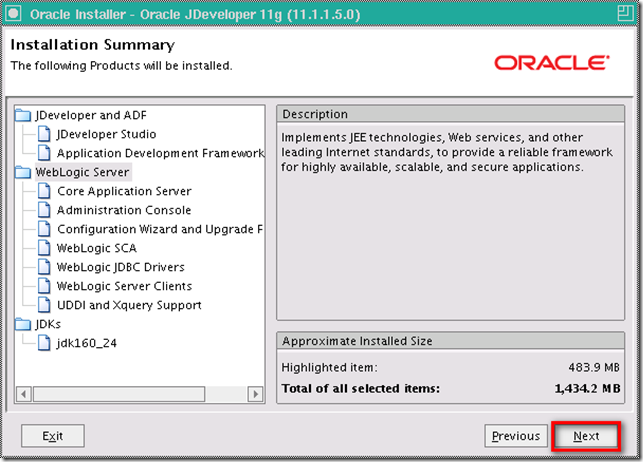
Review the Installation Summary, then Next
JDeveloper installing...
uncheck the Run Quickstart, then Done
Install SOA Extension on JDeveloper
Choose Default Role when you first time run the JDeveloper, then OKDepends on you want to report your usuage to Oracle or not, then OK
In menu Help > Check for Updates
In Welcome window, Next
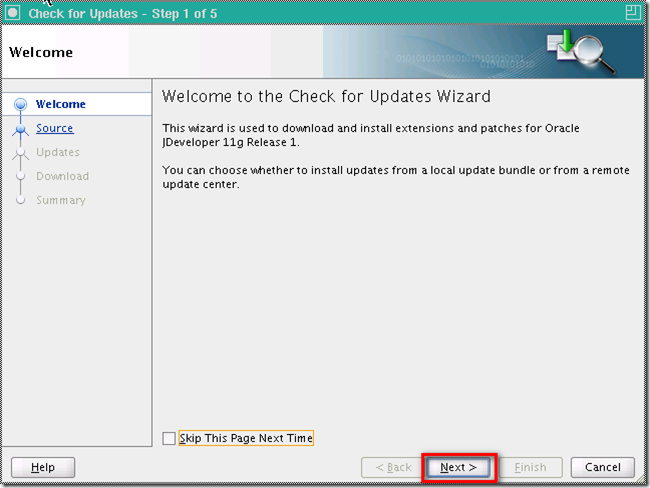
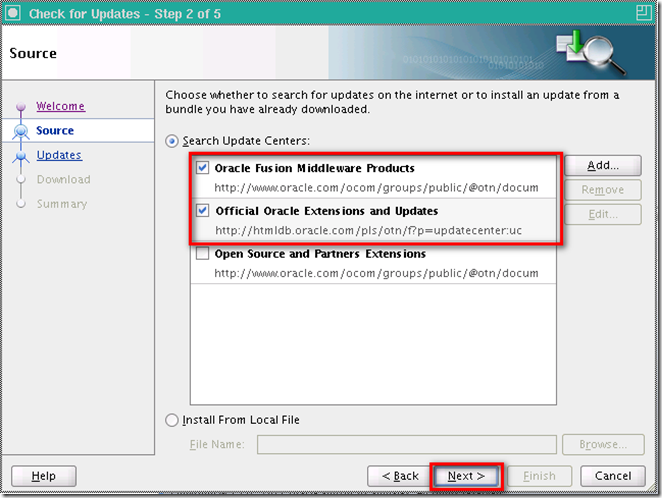
Check Oracle Fusion Middleware Products and Official Oracle Extensions and Updates, then Next
Check Oracle BPM Studio 11g and Oracle SOA Composite Editor, then Next
The update is downloading...
Extension installed, Finish
Yes and restart the JDeveloper
Appendix
cd $DOMAIN_HOME/bin./startWebLogic.sh to start the SOA Platform
We will see the SOA Platform is running and accepting requests to know the server is ready.
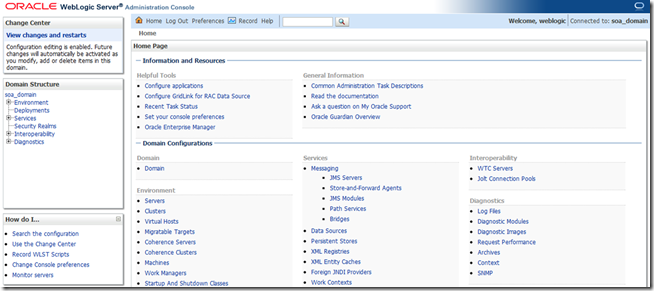
Browse yoursoaserverip:7001/console
Logon as weblogic and password you specified previously, then Login
We will see the server is ready, Yay!
Reference Oracle SOA Suite 11g Installations Document